Friday, January 25, 2019

Nokia 8, battery


Nokia 8 – battery life, much better than other phones

After about one year with my Nokia 8, I can now tell that the battery life exceeded all my expectancies. In general, with normal use of network, WIFI and telephone communications, the recharge cycle has been better than two days, mostly three days, occasionally longer. The processor is fast, updating applications or Android system doe take very little time. Starting or restarting is also very fast.  The fingerprint screen unlocking is flawless and saves you a lot of time when opening the screen. The cameras (three) with a Zeiss lens are bright and produce clear images, even in less than optimal light conditions. In my opinion a great smart phone.


Saturday, March 3, 2018

Nokia 8, first experiences


I changed my Nokia Lumia 1020 ”camera” phone for a new Nokia 8 Android. The Windows system has de facto come to an end, and I used the phone only for its superb camera, which I used on y field trips. However, it was time to change, and the new Nokia 8 just looked right.

The Nokia 8 has great satellite navigation capabilities, GPS, GLONASS, BEIDOU, Galileo and QZSS, all present systems can be used. I had to test several GPS applications before I got the right one, showing all, e.g. GPS test by barbeauDev LINK. The only problem with the Galileo GNSS seems to be that the system is not yet complete yet. I live in northern Finland and I see only occasionally one to five satellites. However, satellite fix and position accuracy seems to be much better than with my Sony Xperia, elevation is much more accurate and stable, but due to present winter temperatures, I have not made any real accuracy tests outside.  But, inside, and even in an airplane the navigation works flawless.


Other things I like are the clean Android, no “added” software reducing battery time, clear screen, fingerprint screen lock, even a barometer, which you can use to check elevation or changes in weather. Camera has the old renowned Zeiss optics, 13 MP, and autofocus works with no problems (unlike my Sony). It has also a fron and back camera which can be used simultaneously to take selfy and landscape (although I do not know if I would use it). The price is really good, around 400 €, with 64 GB memory, and real quality design that is good value.

Saturday, February 10, 2018

Microsoft Onedrive Files On Demand


Microsoft did it at last, finally we got back the off-line file system. Onedrive is a great thing, but the constant downloading and uploading of files to all your devices became a big nuisance. The other problem is the fact that tablets usually have limited space on flash disks, and this meant you could not use Onedrive at all. Now this has changes with the newest Widows 10 version. Onedrive Files On Demand works fine, but has to be explicitly activated. This is a relatively simple procedure, and is explained on


You can now choose to use files locally (Off-Line use) of directly from the cloud, saving space and syncing time. The system works very well, and I have experienced no problems at all, even at low network speed.

Tuesday, December 5, 2017

Galileo, where is it?

Galileo the European satellite navigation system became operational 15th December 2016, so now it has been working for nearly a year. Galileo will be more precise than the American GPS or Russian GLONASS systems. But when combined the time to get a fix on your position will be reduced and the accuracy improved, especially in buildup or forested areas.

However, said this, where are the Galileo enabled devices? My Sony Xperia shows me GPS, GLONASS and the Chinese BeiDou, but no Galileo. A quick look on the USEGALILEO.EU site will give you an overview of the availability of enabled mobile phones or other devices, like drones. At date there are 29 mobile phones listed which are Galileo enabled, for example Nokia 8, iPhone 8, Samsung S8, Sony Xperia XZ Premium, mostly high-end phones. Only 19 drones are listed, usually expensive professional use devices

So if you aim to  get extra accuracy to your positioning, drone or smart phone, I advise to check the technical information of the products you are interested in.


Friday, August 25, 2017

MeteoEarth

MeteoEarth – 3D global weather view

MeteoEarth 3D is a great app for viewing and tracking weather systems around the globe. It has versions for use in use in browsers, but the iPad app I use most frequently. The app is cool and self-explaining. By paying 10 € for the premium version (12 months) you get wind data from sea level up to 9000 meters.it shows wind direction and velocity, precipitation, temperature and air pressure. in addition, major storm systems like hurricanes and typhoons are shown together with their track. It is great for educational purposes, it makes it easy to explain the jet stream, cyclones and anti-cyclones, global climate and weather systems etc.


Of course, some features could be added to improve insight, for example the equator, which would make the seasonal variation of the ITCZ more easy to follow. Otherwise a great app, even the free version.


See MeteoEarth.com   for more information.


Tuesday, November 8, 2016

Windows to Android


Recently I was forced to buy a new phone, as my old Lumia 920 started to show signs of wear and tear. It seems that Microsoft had no intentions to release new phones after the Lumia 950, and so my options were limited to iPhone or Googles Android. My preferred model was the Sony Xperia Z5, because it is water and dust proof, which is a great feature for outdoor use.

My first week using the new Android device was not a success, overheating, fast battery drain etc. It took me a while to figure out the issues, the WIFI seems to drain the battery and overheat the device fast, and it is preferable to swath it only on when in the vicinity of a strong WLAN. The display of course (HD) also uses a lot of energy and one should reduce the display brightness to a minimum. The use of Battery 360 help to improve battery life and now I have about 26 to 29 hours between charging.

To get your contacts from the Windows phone to the Android was done easily by just syncing email accounts (Exchange, Hotmail, Outlook). Onedrive works, but syncing is less fluent then on the Lumia due to WIFI issues, if left on in a weak WLAN the battery starts to heat up and drains fast. The camera is ok, but images are often out of focus and the Geotag hundreds of meters off, much worse than my Lumia 1020 or old Lumia 920. Setting camera to autofocus helps.

The smartlock feature, where you can use (your) face recognition  or geolocated “safe” places is awful, as indoor GPS-locations are always inaccurate and face recognition works only when holding the phone in the right angle and at the right distance from your face.

The thing I hate most is the relentless efforts the phone makes to get your details, location and web usage for marketing services. All these feature can be switched off, but this takes time and one must go into Google setups. It is also unclear what exactly Google Services actually do, the consume quite a lot of  power, so it is clear that they monitor phone usage in many ways.


In comparison I found the Lumia Windows system more balanced, more reliable, and Apps have far less advertisements. All in all, I still favor my Luumia 1020, and the Xperia phone is just my personal backup. 

Tuesday, December 22, 2015

Windows 10, Onedrive and odrive

As I use about ten different Widows platforms, PC’s, laptop, tablets and phones it is a must to have my data files in a reliable cloud server. Onedrive has proven to be reliable and stable, until I updated one of my laptops to windows 10. After the update I notices that all data had to be stored both locally on the computer and offline on the cloud server. This creates an unusual amount of net traffic, which actually bogs up any network connection. Many paces have still rather limited bandwidth, 10/1, or even less. And upload is usually very slow, much slower than download. Now my Windows 8 machines just use offline storage, whit occasional local backups, and this worked nicely.

After starting to work with Onedrive for Business, things became worse and I had to shut down the cloud service on my Windows 10 laptop. This has made my life easier, but it is not very sophisticated to use Onedrive files through a Web Application.

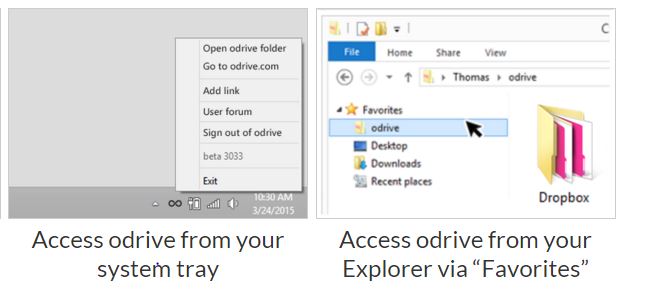
There are several work around, but not very elegant. One third party cloud client is orive, which actually integrates many cloud services, like Onedrive, Dropbox, Google and a lot of others. Just download the application from odrive for your platform (Mac or Windows) and start enjoying the lost functionality of Smart Files.  Odrive creates a placeholder on your system tray, and work just as a directory. But of course remember, these files are on the Onedrive cloud only, you can access them only when having network access.


Presently odrive has no way for integrating Onedrive for Business, so we are still waiting for that.