Friday, August 25, 2017

MeteoEarth

MeteoEarth – 3D global weather view

MeteoEarth 3D is a great app for viewing and tracking weather systems around the globe. It has versions for use in use in browsers, but the iPad app I use most frequently. The app is cool and self-explaining. By paying 10 € for the premium version (12 months) you get wind data from sea level up to 9000 meters.it shows wind direction and velocity, precipitation, temperature and air pressure. in addition, major storm systems like hurricanes and typhoons are shown together with their track. It is great for educational purposes, it makes it easy to explain the jet stream, cyclones and anti-cyclones, global climate and weather systems etc.


Of course, some features could be added to improve insight, for example the equator, which would make the seasonal variation of the ITCZ more easy to follow. Otherwise a great app, even the free version.


See MeteoEarth.com   for more information.


Tuesday, November 8, 2016

Windows to Android


Recently I was forced to buy a new phone, as my old Lumia 920 started to show signs of wear and tear. It seems that Microsoft had no intentions to release new phones after the Lumia 950, and so my options were limited to iPhone or Googles Android. My preferred model was the Sony Xperia Z5, because it is water and dust proof, which is a great feature for outdoor use.

My first week using the new Android device was not a success, overheating, fast battery drain etc. It took me a while to figure out the issues, the WIFI seems to drain the battery and overheat the device fast, and it is preferable to swath it only on when in the vicinity of a strong WLAN. The display of course (HD) also uses a lot of energy and one should reduce the display brightness to a minimum. The use of Battery 360 help to improve battery life and now I have about 26 to 29 hours between charging.

To get your contacts from the Windows phone to the Android was done easily by just syncing email accounts (Exchange, Hotmail, Outlook). Onedrive works, but syncing is less fluent then on the Lumia due to WIFI issues, if left on in a weak WLAN the battery starts to heat up and drains fast. The camera is ok, but images are often out of focus and the Geotag hundreds of meters off, much worse than my Lumia 1020 or old Lumia 920. Setting camera to autofocus helps.

The smartlock feature, where you can use (your) face recognition  or geolocated “safe” places is awful, as indoor GPS-locations are always inaccurate and face recognition works only when holding the phone in the right angle and at the right distance from your face.

The thing I hate most is the relentless efforts the phone makes to get your details, location and web usage for marketing services. All these feature can be switched off, but this takes time and one must go into Google setups. It is also unclear what exactly Google Services actually do, the consume quite a lot of  power, so it is clear that they monitor phone usage in many ways.


In comparison I found the Lumia Windows system more balanced, more reliable, and Apps have far less advertisements. All in all, I still favor my Luumia 1020, and the Xperia phone is just my personal backup. 

Tuesday, December 22, 2015

Windows 10, Onedrive and odrive

As I use about ten different Widows platforms, PC’s, laptop, tablets and phones it is a must to have my data files in a reliable cloud server. Onedrive has proven to be reliable and stable, until I updated one of my laptops to windows 10. After the update I notices that all data had to be stored both locally on the computer and offline on the cloud server. This creates an unusual amount of net traffic, which actually bogs up any network connection. Many paces have still rather limited bandwidth, 10/1, or even less. And upload is usually very slow, much slower than download. Now my Windows 8 machines just use offline storage, whit occasional local backups, and this worked nicely.

After starting to work with Onedrive for Business, things became worse and I had to shut down the cloud service on my Windows 10 laptop. This has made my life easier, but it is not very sophisticated to use Onedrive files through a Web Application.

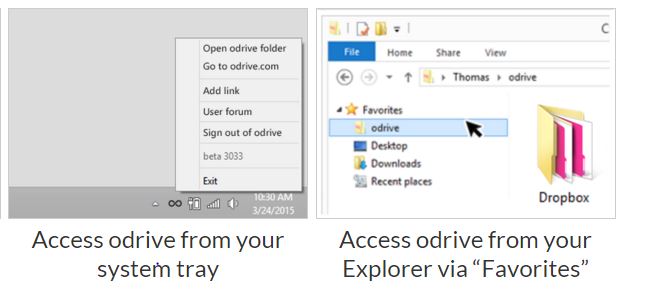
There are several work around, but not very elegant. One third party cloud client is orive, which actually integrates many cloud services, like Onedrive, Dropbox, Google and a lot of others. Just download the application from odrive for your platform (Mac or Windows) and start enjoying the lost functionality of Smart Files.  Odrive creates a placeholder on your system tray, and work just as a directory. But of course remember, these files are on the Onedrive cloud only, you can access them only when having network access.


Presently odrive has no way for integrating Onedrive for Business, so we are still waiting for that.


Friday, September 18, 2015

Windows 10, first experience

Last night I upgraded my ACER touchscreen laptop from Windows 8.1 to 10. It took several hours, to download, install, verify and modify the new system, but everything went smoothly and without problems. All installed programs and applications worked properly in the new environment, the only exception being F-Secure antivirus, which seemed to be deleted by the new installation.

I already knew, that Windows 10 would be something incorporating the best features of 7 and 8, but actually my very first impression was slightly disappointed. In my view Microsoft took a step back, from the dynamic looks of Windows 8 to a more conservative approach, perhaps this is what the public wanted.

The good thing is that one can now decide on a Tablet view (for a tablet computer) or a Windows 7 look for a normal mouse operated laptop or desktop PC. It is supposed to work with hybrids (tablet with removable keyboard, in such a way that it automatically switches from Desktop view to Tablet view. Also the bottom Taskbar can be hidden using from the Tablet view in Settings. This is often necessary as in tablet mode the Taskbar hides the lower part of the application windows, which can cause problems when, for example, it covers the NEXT button in an application.

In my opinion, the Tablet view in Windows 10 is less elegant than in windows 8.1, but this can still be improved. The old Windows 7 Desktop look is boring and not very impressive, but at least everything works. For smaller tablets running Windows 10, the zoom function (magnifier) is still the same as with windows 7 and 8, cumbersome and missing the elegance of the iPad´s three finger gesture, or the Lumia phone´stwo finger gesture, amazing that this has not been resolved.

Windows 10 managed to resolve the problem of the two operating environments, touchscreen and mouse driven, into one operating system, which is a good thing. However, as touchscreen displays proliferate the need for a next generation operating system will come soon, as this is by far a  more interactive and intuitive environment to work in. It is so much easier to use your fingers than to find a mouse under a pile of papers!


Friday, August 7, 2015

Lost your USB-stick?


Now I finally have my Microsoft Windows devices tuned and synchronized. I have of course a desk top computer in my office, a laptop at home, a Lenovo tablet (8”) and a Fujitsu hybrid tablet (10”) all running Windows 7 or 8.1. Two Windows Phones, a Lumia 920 and a Lumia 1020 finalize my working environment.

As a geographer I work often in the field and need georeferenced data, pictures I take must be georeferenced and they are automatically stored on the OneDrive cloud when I am in reach of a WIFI connection notes I store on OneNote and I can access this data on all devices, even on my iPad which I still use as also here I can access OneDrive. All my data is stored directly on OneDrive for Business or on my Personal OneDrive.

USB-sticks seem to be already old fashioned, but still I carry some with me, as in some parts of the world internet is still not reliable and access can be slow or impossible. And to be on the safe side, it can be very sensible to make some backups on DVD disks, because we cannot be sure that OneDrive will be always there, for example F-Secure’s secure encrypted cloud Younited was sold and discontinued, leaving its users in the cold.

For important data, I can only recommend to do regular DVD backups, as everything else, USB-sticks, hard drives, everything can be stolen, broken, burnt, destroyed or get lost. Working with a cloud server gives you instant backup, but for permanent storage still a physical copy is the best you can get.


My next project will be to see how well an Android device will fit into my “ecosystem”.

Monday, January 26, 2015

Geo Cam and Lumia 1020


Geo Cam and Lumia 1020

We all know that you can geotag pictures storing location (and other information) of the image using your smart phones. If you want an image that displays this information visible in the picture you should use Geo CAM, (Geographic Camera) 

This is an easy to use and handy application for the more geographically minded.
I also got a Lumia 1020 now, the image quality is of course suburb, nothing new about that, but the GPS outperforms my old Lumia 920. The GPS gets ultra-fast fixes, and works even inside an airplane, if you are seated next to the window.  It also gives you the opportunity to save pictures in RAW format, which gives you all the possibilities of post-editing using for example Photoshop. 


Friday, March 28, 2014

GeoPhoto, another application to show the geographical places you visited


Geophoto is an App like Nokia Storyteller, but has less features, and is therefore much faster. Unlike Storyteller, GeoPhoto shows the actual images on the map, the icons can be round or square. By clicking the image you can get access to the information regarding the image, location, time, etc. You can also access the navigation software like Nokia Drive to navigate to the location. You can edit the location, share it with your friends and a lot more.


All in all, all very great application for free, and if you want an advertisement free version just pay a few Eurosa, it is worth it.